Cut A: Meet Recording → Matched Entities → Approve → POC
Most CRM demos start on an empty form. Cut A starts on the meeting: record in Google Meet, match names mid-spelling, approve Create Deal + Create POC Task, then finish with the recording still in the Cursor thread.
Most CRM demos open on a blank account form and pretend the hard part is typing. The hard part is everything that happened before the form — the discovery call, the misspelled names, the agent that wants to create a deal before anyone said yes.
Cockpit Cut A is the everyday path we run: Google Meet record → intake → source-of-truth match → human approve-before-start → scoped POC in the same thread. No silent duplicates. No auto-start.
Watch the captioned walkthrough first — four beats, one loop:
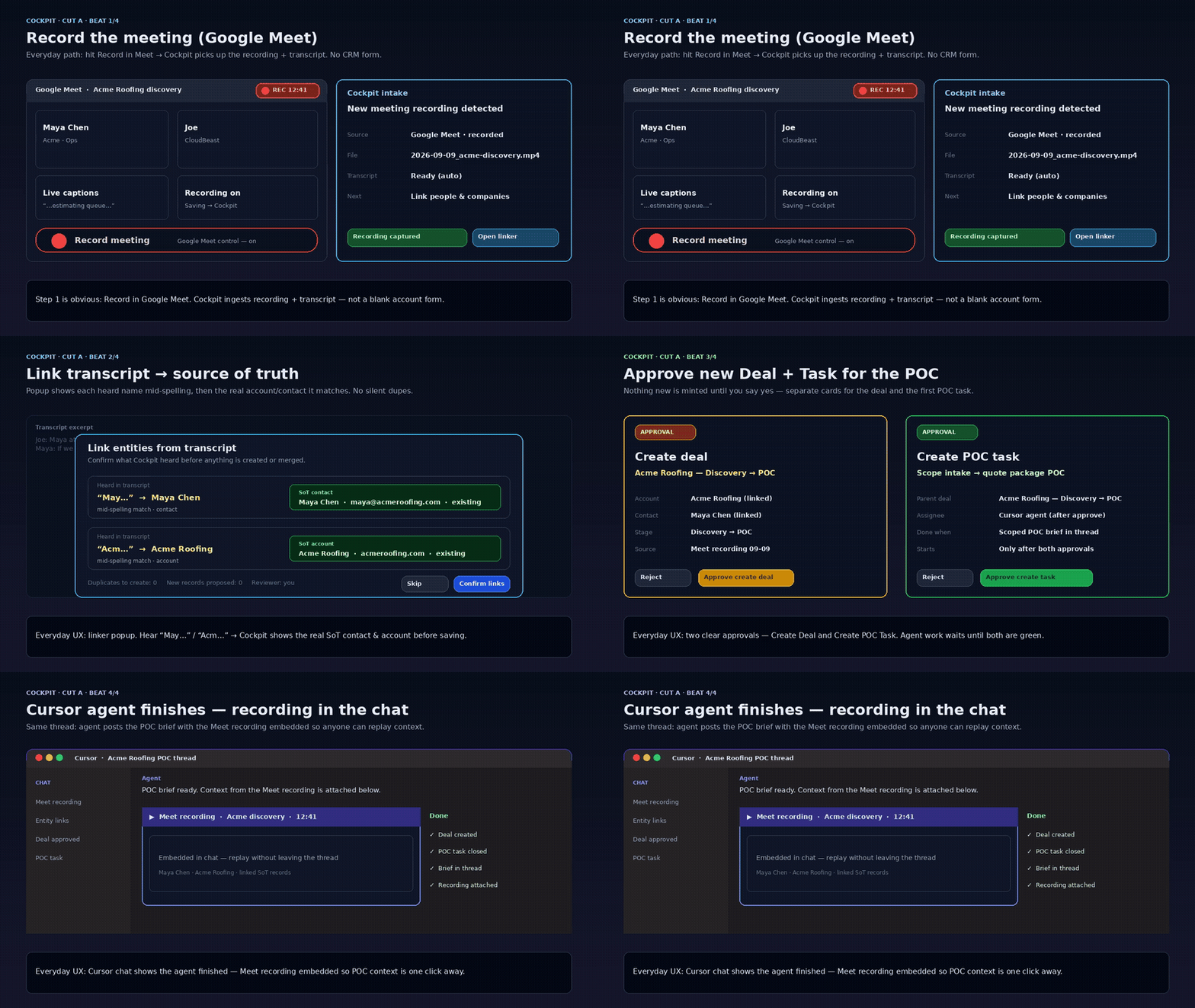
Beat 1 — Record in Google Meet; Cockpit intakes the file + transcript
Hit Record in Meet. The REC pill is on. When the call ends, Cockpit catches the recording and the transcript as an intake card — not a download folder you will lose by Friday.
That is the first product claim: the meeting is a first-class object, not an attachment you paste into a ticket later.
Beat 2 — SoT linker mid-spelling (no silent duplicates)
Names arrive wrong. Transcripts invent people. Cut A does not auto-merge on a fuzzy first hit.
Type May… → Maya Chen. Type Acm… → Acme Roofing. Confirm the links before save. Zero silent duplicates. Mid-spelling match is the point — you should not need the perfect string to land on the right contact and account.
If you have lived the “three Acmes and two Mayas” cleanup week, this beat is the whole demo.
Beat 3 — Approve Create Deal + Create POC Task (approve-before-start)
The desk proposes two cards: Create Deal and Create POC Task. The agent waits. Both stay blocked until a human turns them green.
That gate is not ceremony. It is the same spine we wrote up in Approve-Before-Start Is the Product: desks propose, humans start, agents finish inside the lease. Cut A makes the gate visible in the UX — two approvals, then work.
No approve, no deal. No approve, no POC task. The agent does not invent a start.
Beat 4 — Cursor finishes with the Meet recording in-thread
After both approvals, the Cursor agent runs the scoped POC work with the Meet recording embedded in the same chat thread. Done checklist in view. The call context never left the work item.
That is the close of the loop: the recording that started Beat 1 is still attached when the agent says done. You do not re-key the discovery note into a separate project tool.
Why this is the product (not “more agents”)
Chat tools automate a session. CRMs store records. Project tools store tasks. None of them close call → matched entities → human start → finished POC without a re-key tax.
Cockpit is the control plane for that loop — the same OS framing as Approve to Start: Cockpit Is the OS You Already Run. Cut A is the concrete, everyday path. Cut B is out of scope here.
What you can sell from this walkthrough today:
- Meeting ingest with transcript
- Entity match you confirm (typos welcome; silent merge is not)
- Approvals inbox before create/start
- Bound agent runtime (Cursor) that finishes with evidence in-thread
What we are not claiming in this post: live authenticated UI capture of every Cockpit screen (this Cut A package is the captioned product storyboard SDR already links in HOLD Variant A), SDR auto-send, or Cut B.
Try the path
See the product page at cloudbeast.io/cockpit. If you want this loop on your own discovery calls — record, match, approve, ship — book a discovery call.
Ready to see where AI fits in your business?
Book a call — we'll map your workflows, quick wins, and a realistic path forward.